
WordPress Migration Services
Moving your WordPress site to a new host, a new platform, or a new domain, without losing data, traffic, or sleep? We handle WordPress migrations end to end, so your site moves safely with no data loss, minimal downtime, and no drop in your search rankings. From a simple host change to a full platform migration, we move your site the right way and test everything before you go live.
Safe
No data loss
Fast
Minimal downtime
SEO safe
Rankings kept
Support
We stay after launch


WordPress Migration Without the Risk
A WordPress migration sounds simple, but a lot can go wrong. Broken links, missing images, lost orders, a slow new server, or a drop in Google rankings can all follow a rushed move. Most good hosts offer a free migration, and for a simple host to host move that is often enough. But when the move is more complex, a new platform, a new domain, a large store, or custom functionality, you want it handled by people who do this every day.
That is where we come in. We plan your migration, back everything up, rebuild and test on a staging site, then take you live with minimal downtime and no lost data. We protect your URLs and SEO so your traffic stays intact, and we stay with you after launch to make sure everything runs smoothly. If your host offers a free migration and it covers your needs, use it. If you still need help, we are here.
WordPress Migrations We Handle
Whatever kind of move you need, we handle it end to end, so your site arrives complete, fast, and intact.

Move to a New Host or Server
We move your WordPress site to a faster or more reliable host or server, with all your files, database, and settings intact and minimal downtime.

Domain Name and URL Change
We move your site to a new domain or URL structure safely, updating every link and setting up redirects so you keep your traffic and rankings.

Platform to WordPress
We migrate your site to WordPress from Shopify, Wix, Squarespace, Drupal, Joomla, or Magento, bringing your content and structure across cleanly.

HTTP to HTTPS (SSL)
We move your site to a secure HTTPS setup, fixing mixed content and redirects so your site is safe and trusted.

We move your online store, including products, orders, and customers, so nothing is lost and your store keeps selling.

Database Migration
We migrate your database carefully, handling search and replace and serialized data so nothing breaks in the move.
Multisite Migration
We move single sites into a WordPress multisite, or split a multisite into standalone sites, without losing content or users.

Content and Media Migration
We bring across your posts, pages, media library, menus, and users, so your new site is complete from day one.
PHP and Core Upgrade
We can upgrade your PHP version and WordPress core as part of the move, so your new site is faster, safer, and up to date.
Staging to Live
We build and test your changes on a private staging site, then push them live safely when they are ready.
Why Professional WordPress Migration Matters
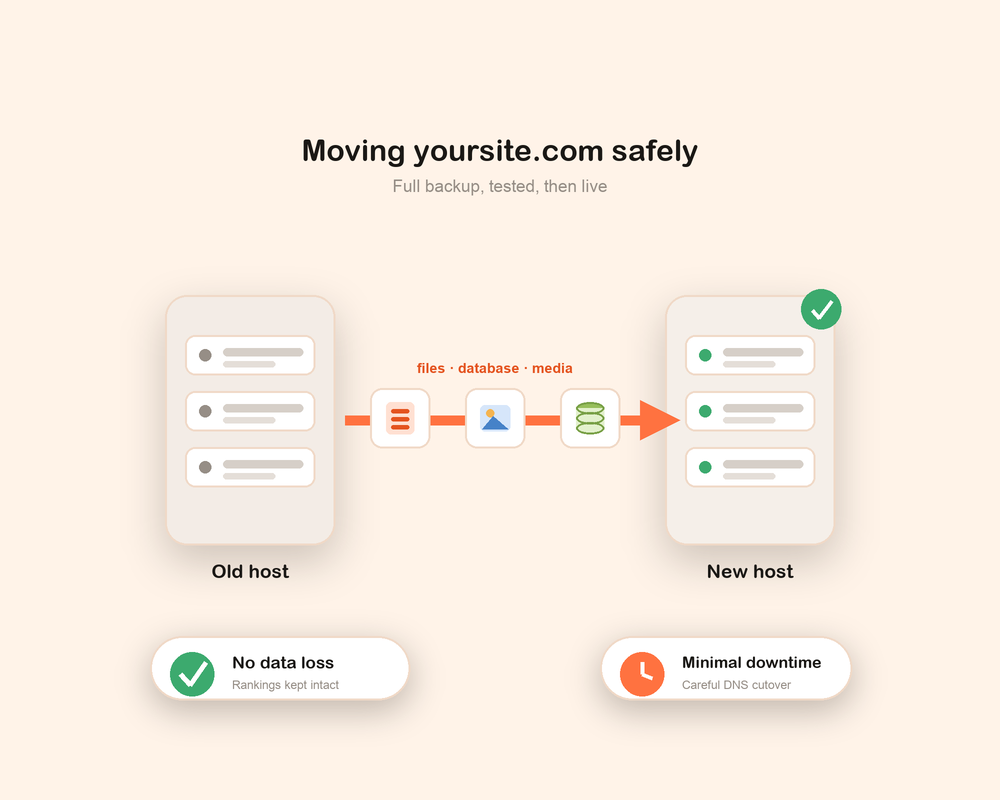
Anyone can copy files from one place to another. The real value comes from moving a live site without breaking it. Professional migration means a full backup, a tested staging build, a careful DNS cutover, and a plan to roll back if anything goes wrong, so your site is never left broken in front of your visitors.
A rushed migration can cost you traffic and sales. Broken redirects drop your Google rankings, missing images hurt your pages, and a bad database move can lose orders or user accounts. We handle the technical details so your move is smooth, your SEO stays intact, and your site loads just as fast or faster on its new home.
Our WordPress Migration Process
We follow a clear, proven process so your migration runs smoothly from start to finish, with no surprises along the way.
1
Audit and Plan
We review your current site, hosting, and content, then map out exactly what needs to move and how, before we touch anything.
2
Full Backup
We take a complete backup of your files and database, so your original site is always safe and we can roll back if needed.
3
Staging Build
We rebuild your site on a private staging environment, so we can move and test everything without touching your live site.
4
Testing
We test every page, link, form, and feature, checking speed, security, and that nothing is missing, before go live.
5
Go Live
We take your site live with a careful DNS cutover, timed to keep downtime to a minimum, so visitors barely notice the move.
6
Post-Launch Checks
After launch we verify redirects, Search Console, and performance, and we stay on hand to fix anything that comes up.
At every step we keep you informed, so you always know what is happening and what comes next.
Why Choose Optmistic Technologies
Choosing the right migration partner makes all the difference to your site and your peace of mind. Here is what sets our work apart.
No data loss
We back up everything and move it carefully, so your content, orders, and users all come across intact.
Minimal downtime
We plan the DNS cutover to keep downtime to a minimum, so visitors barely notice the move.
SEO protected
We keep your URLs and set up redirects, so your traffic and rankings stay where they are.
Tested before launch
We rebuild and test on staging first, so nothing goes live until it is working properly.
Safe rollback
We keep your original site ready, so if anything goes wrong we can switch back quickly.
Support that lasts
We are here after the move too, ready to help your site settle into its new home.
The Migration Tools We Use
We use the right tool for each migration, and we are confident with manual migrations when a site is too large or complex for a plugin. Our goal is always a clean, complete, and safe move.
For many sites we use trusted migration plugins such as All-in-One WP Migration, Duplicator, WP Migrate, Migrate Guru, UpdraftPlus, and WPvivid. For large stores, multisite networks, and custom setups, we often migrate the files and database manually with careful search and replace, so serialized data and custom code move across cleanly. Whatever the method, we test everything on a staging site before we take you live.
All-in-One WP Migration Duplicator WP Migrate Migrate Guru UpdraftPlus WPvivid Manual Migration Staging
How We Protect Your SEO During Migration
A migration is one of the riskiest times for your search rankings, so we treat SEO as a core part of the move, not an afterthought. We map your old URLs to the new ones and set up 301 redirects, so no link or ranking is lost along the way.
We keep your permalink structure where we can, move your metadata and image alt text, update your sitemap, and let Google know about the change through Search Console. After launch we watch your traffic and rankings and fix any issue quickly, so your move stays invisible to Google and to your visitors.
What Affects the Cost of WordPress Migration
Every migration is different, so the cost depends on what your move actually involves. Rather than a one size fits all price, we look at your site and give you a clear, fair quote with no hidden surprises.
The main things that shape the cost are the size of your site, the type of migration, and how much needs to be rebuilt or fixed along the way. A simple host to host move costs less than a full platform migration, a large store, or a multisite network. We are always upfront about what drives the price, so you know exactly what you are paying for. To get a clear quote for your migration, just tell us about your site.
Ready to Migrate Your WordPress Site?
If you want your WordPress site moved safely, with no data loss, minimal downtime, and no drop in rankings, we are ready to help. Our team handles the full migration, from the first plan to go live and beyond, so you can relax while your site moves to its new home. Tell us about your site and we will show you how we can help.
WordPress Migration FAQs
What is a WordPress migration service?
A WordPress migration service moves your website safely from one place to another, such as a new host, a new domain, or from another platform to WordPress. We handle the backup, the move, the testing, and the go live, so nothing is lost and your site keeps working.
How long does a WordPress migration take?
Most standard migrations take anywhere from a day to a few days, while large stores, platform migrations, or complex sites take longer. After we review your site, we share a clear timeline so you know what to expect.
Will migrating my site affect my SEO?
Not when it is done right. We map your URLs and set up 301 redirects, keep your metadata, and update Search Console, so your rankings and traffic stay intact. We also watch your traffic after launch and fix any issue quickly.
Most hosts offer free migration. Do I still need you?
If your host offers a free migration and it covers a simple host to host move, that is often enough. We help when the move is more complex, such as a platform migration, a new domain, a large store, or a custom site, or when you want no data loss and no SEO drop handled by experts.
Will my site go down during the migration?
We plan the move to keep downtime to a minimum. We rebuild and test on a staging site first, then switch over with a careful DNS cutover. There is usually a short window while DNS updates, but most visitors never notice the move.
Can you migrate my site from Shopify, Wix, or another platform?
Yes. We migrate sites to WordPress from Shopify, Wix, Squarespace, Drupal, Joomla, and Magento, bringing your content and structure across cleanly.
Which migration tools and plugins do you use?
We use trusted tools like All-in-One WP Migration, Duplicator, WP Migrate, Migrate Guru, UpdraftPlus, and WPvivid, and we migrate manually for large or complex sites. We pick the method that is safest for your site.
Do I need to move my email separately?
Email is usually handled separately from your website, so we flag what needs to move and guide you through it, so you do not lose any email in the switch.
What if something goes wrong during the migration?
We keep a full backup of your original site, so if anything goes wrong we can roll back quickly. Because we test everything on staging first, most problems are caught before your site goes live.
Do you provide support after the migration?
Yes. After your site goes live we check redirects, performance, and rankings, and we stay on hand to fix anything that comes up, so your site settles smoothly into its new home.